Command palette modes from their prefix keys
in 3.7 pre-rel
Typing
>, @, #, $, % or & at the document opens the command palette in that mode: commands, open tabs, file history, favorites, table of contents, page thumbnails. They follow the keyboard layout, and a text field still gets the character. Each mode has a command for shortcuts: CmdNavigateTabs, CmdNavigateHistory, CmdNavigateFavorites, CmdNavigateTableOfContents and CmdNavigateThumbnail, and CmdQuickEditSettings opens the settings list.Delete restores a setting's default
In Advanced Settings and in the command palette’s
= settings list, Delete puts the selected setting back to its default. The help line at the bottom of each says so.Auto-rotate wide comic pages
Auto-Rotate Wide Pages (
CmdToggleAutoRotateWidePages, View menu for comics, ComicBookUI.AutoRotateWidePages, off by default) turns a double-page spread (a page wider than it is tall) so its long side follows the window’s, in single-page layouts. With the comic rotated 90° the spread shows upright, and Fit Page keeps it as large as the other pages (#6305).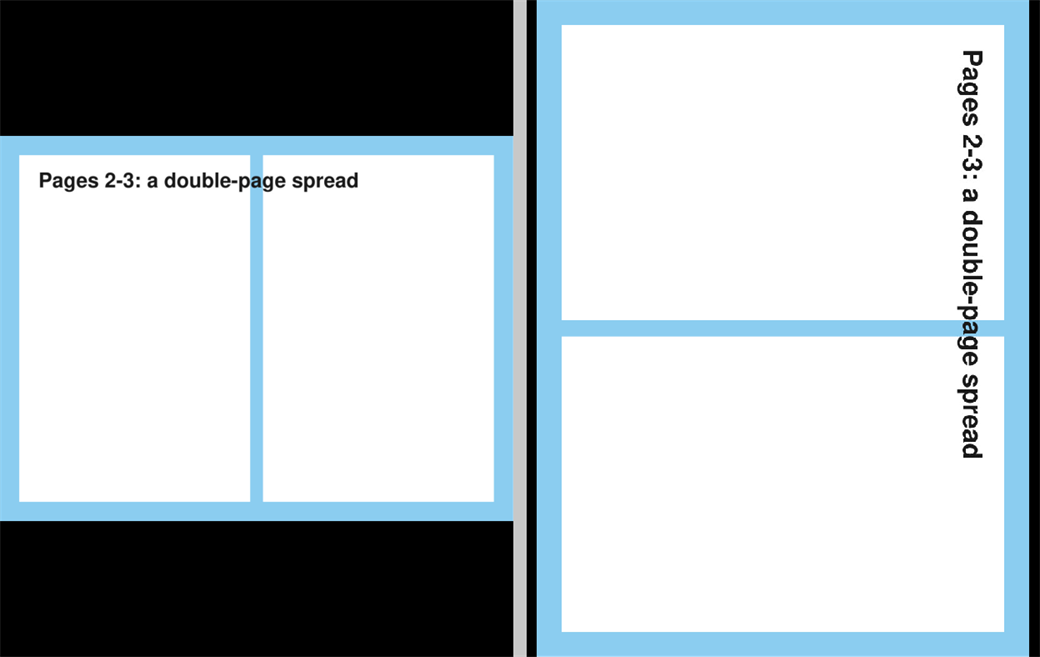
Note preview in the Annotations window
The Annotations window (Find Annotation) has an eye button beside its search box that shows the selected annotation’s note under the list, up to six lines, so you can read long notes while clicking through the list. It is remembered in
AnnotationsWindowShowNote. The ? beside it opens the search syntax in the manual, which replaces the cheat sheet under the buttons (#6287).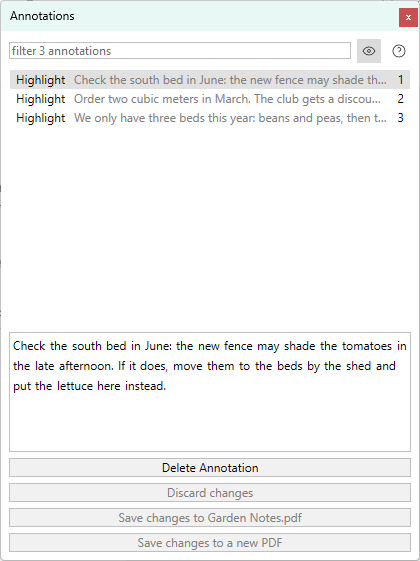
AIChat policy for restricted use
sumatrapdfrestrict.ini has an AIChat policy. With the file present, AI chat and AI translation are off unless it says AIChat = 1, and also when InternetAccess or DiskAccess is 0: the chat panel, its commands and the AI translate commands disappear and no AI agent is started (#6314).Approval and certifying signatures
Sign Document no longer locks all form fields with each signature, which made a second signature invalidate the first in Acrobat. A new Signature type drop-down offers Approval signature, certifying signatures that say what the document still allows (no changes, form filling and signing, or those plus annotations; only while the document has no signature yet), and Lock document after signing (last signer) for the end of a chain. Lock form fields after signing (off by default) brings back the old all-fields lock, and
CmdSignDocument certify opens the dialog set to certify. Document Properties shows a certifying signature’s level, and for a chain of signatures says that later signatures were added instead of that the document was changed (discussion #6315).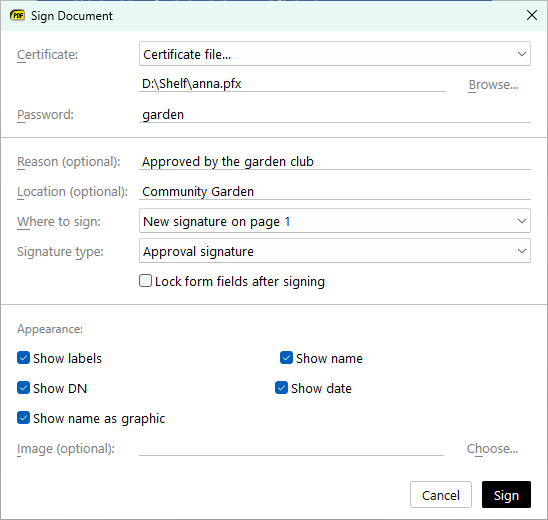
Full-page home page thumbnails
New
ThumbnailsType setting: legacy (the default) shows the top of the first page in a wide frame as before, full scales the whole first page or cover into a tall frame, so a cover is seen whole. The home page grid follows the frame’s shape. Changing the setting re-creates the thumbnails of the files that still exist (#5817).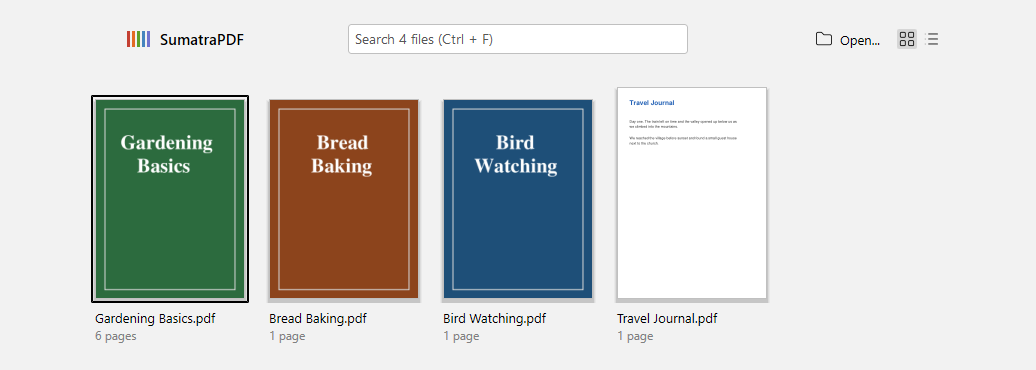
Installer keeps your open documents
The installer asks a running SumatraPDF to quit the way File → Exit does before replacing its files, so the documents it had open are restored by the new version; before, it was terminated and that session was lost. This also works for a renamed portable copy. In the installer options, toggling Install for all users keeps an install folder you typed (#4291).
Installer -x extracts into a folder
The installer’s
-x without -d extracts into a sumatra-files folder under the current one instead of into the current folder. -x -d . still unpacks next to the installer.Windows return to their virtual desktop
A restored session puts each window back on the virtual desktop it was on (
VirtualDesktopId in SessionData); a desktop that no longer exists leaves the window on the current one. Opening a file while SumatraPDF only has windows on other desktops now opens a new window on the current desktop: that check never ran before (#6271).Calmer touchpad page turns
In single page, facing and book view, a precision touchpad swipe no longer races through many pages. A page turn takes as much touchpad travel as scrolling a window’s height does in continuous mode; a mouse wheel notch still turns one page (#3755).
Half-page scroll turns the page
Scroll Up Half Page and Scroll Down Half Page turn the page when there is nothing left to scroll, like
Page Up and Page Down. In single page, facing and book view they did nothing at a page edge (#3862).Copy keeps code indentation
Copying selected text keeps the indentation and blank lines of code listings, rebuilt from the position of the characters. Only monospaced text is changed, so prose copies as before (#2423).
EPUB notes after the chapters
EPUB pages marked
linear="no" (footnotes, endnotes) come after the chapters instead of interrupting them, and links to them still work. Pages that the book lists but leaves out of the reading order (an aside only a link points to) are paged after those, where before they couldn’t be opened (#5803).Sumatra File Manager in tips and About
A home page tip and a section in the About box link to Sumatra File Manager.