SumatraPDF can be configured for restricted use, which is useful if you want to use it as a bundled viewer for your program’s documentation or in kiosk mode.
In restricted mode, some actions that are not appropriate in such contexts are disabled:
- opening new files
- launching URLs from within PDF documents
- text and image selection
- printing
- changing default settings
- saving to disk
- automatic and manual update checks
- a history of recently opened files
- TeX preview support
- registering as a default PDF viewer
- opening with Adobe Acrobat
- emailing PDFs
- AI chat and AI translation
To restrict SumatraPDF, put a
sumatrapdfrestrict.ini file in the same directory as SumatraPDF.exe. Every policy the file does not mention is off, so list the ones you want to keep.Settings → Configure Restricted Use… creates, edits, or deletes this file. Select a policy with the mouse or arrow keys and toggle it with its checkbox or Enter. Values changed since opening the dialog are bold. Writing beside an installed
SumatraPDF.exe may require administrator access; the dialog offers to restart elevated when needed.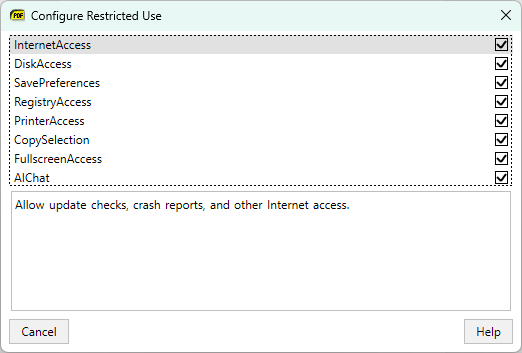
The
-restrict command-line argument turns everything off, as if the file were present and empty.sumatrapdfrestrict.ini #
The reference file is docs/sumatrapdfrestrict.ini in the repository. It enables everything, so edit the values you want to turn off:
; This is an example configuration file which can be used
; to disable some of SumatraPDF's functionality.

; To apply this configuration, copy this file into
; the same directory as SumatraPDF.exe.

; All settings listed below can have a value of either
; 0 for disabling the feature or 1 for enabling the feature
; (missing settings default to 0).

[Policies]
; Whether SumatraPDF should be allowed to access the Internet.
; Needed for:
; * Checking for updates
; * Sending crash reports
InternetAccess = 1

; Whether SumatraPDF should allow access to the file system.
; Needed for:
; * Opening files through dialog
; * Saving file or bookmark shortcut
; * Opening a web browser after a click on a hyperlink
; * Launching external PDF viewers, LaTeX source editors or media players
; * Displaying Frequently Read page (also requires SavePreferences)
; * Reopening recently opened files
DiskAccess = 1

; Whether SumatraPDF should save user preferences on exit.
; Needed for:
; * Changing settings
; * Favorites menu
; * Remembering recently opened files (includes Frequently Read page)
SavePreferences = 1

; Whether SumatraPDF should be allowed to write to the Registry.
; Needed for:
; * Making SumatraPDF a default PDF viewer
RegistryAccess = 1

; Whether SumatraPDF should be allowed to print.
; Needed for:
; * Printing of a document
PrinterAccess = 1

; Whether users should be allowed to select and copy content.
; Needed for:
; * Selecting with the mouse
; * Select all
; * Copying the selection
CopySelection = 1

; Whether SumatraPDF should be allowed to cover the entire screen.
; Needed for:
; * Fullscreen mode and Presentation mode
FullscreenAccess = 1

; Whether SumatraPDF should offer AI features: the "AI Chat with document"
; sidebar and "Translate Selection with ..." for AI agents (Claude Code,
; Grok Build, OpenAI Codex, Antigravity). They run an agent CLI that is
; already installed on the machine and send document content to its service.
; AI is also disabled when InternetAccess or DiskAccess is 0, and whenever
; this file exists without an AIChat = 1 line (missing settings default to 0).
AIChat = 1

; What protocols for links inside documents should be passed
; on to the operating system (e.g. for opening a browser).
; Default: http,https,mailto (web links and email addresses)
LinkProtocols = http,https,mailto

; What file types should be opened in an external application
; if they're linked to by a (PDF) document and can't be opened
; within SumatraPDF itself (use "*" for all types)
; These file types are stored as "PerceivedType" in the Registry,
; common values: audio, video, image, document, text, system
; Default: audio,video,webpage
SafeFileTypes = audio,video,webpage
To disable only auto-detected URL, email, and plain-text DOI links in PDF text (not embedded hyperlinks), use
DisableAutoLinks in normal advanced settings instead. See Hyperlinks.