Are you using an official SumatraPDF build? #
Check that you downloaded SumatraPDF from the official SumatraPDF website. If not, we can’t help you, because we didn’t create the software you’re using.
Uninstalling Sumatra #
SumatraPDF comes as an installer and as a portable version (zipped executable).
Uninstalling portable version #
If you’re using the zipped executable, you only need to delete
SumatraPDF.exe.Uninstalling the installer version #
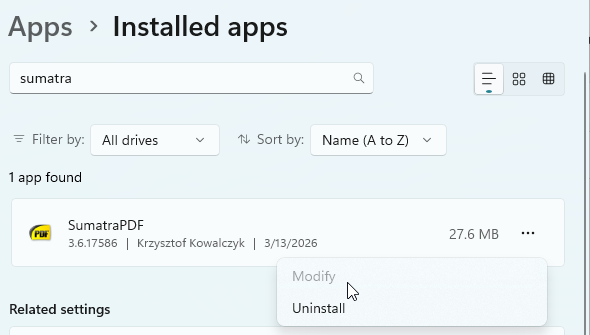
If you installed SumatraPDF by running the official installer, uninstall it like any other application.
On Windows 10 / 11:
- start the Settings app (instructions)
- select
Apps - find
SumatraPDFin the list, click it, and press theUninstallbutton:
What if the above doesn’t help? #
If you still have questions, you can use Discussions to ask for additional help.
However, in order for someone to help you, you need to provide the following information:
- Sumatra PDF version you’re using
- your OS (Windows) version
- whether you downloaded an installer or a zipped executable
- where you downloaded SumatraPDF from (the URL of the webpage you used)
- whether there is a SumatraPDF directory in your Program Files directory (usually
C:\Program FilesorC:\Program Files (x86)on 64-bit systems) - what evidence there is that SumatraPDF is installed. Be precise and specific. Don’t only say “there’s a link to it”. Tell us where that link is, what its name is, etc.
If you don’t provide this information, we cannot help you.