AI Chat with document (Claude Code, Grok Build, OpenAI Codex)
in 3.7 pre-rel
A sidebar where you can ask an AI assistant questions about the open PDF or image. It uses the Claude Code (
CmdAIChatWithClaudeCode), Grok Build (CmdAIChatWithGrokBuild) or OpenAI Codex (CmdAIChatWithOpenAICodex) command-line tool you have installed. Open it from the View menu, the AI chat with document using submenu of the right-click menu, or the Ctrl + K command palette. Each tab keeps its own chat. You can pick the model and effort level and reopen past sessions. Settings are in the ClaudeCode section (Model, Models, Effort, SkipPermissions, …) and in similar sections for the other tools. Requires Windows 10 or later.Modern CHM viewer and in-app manual via WebView2
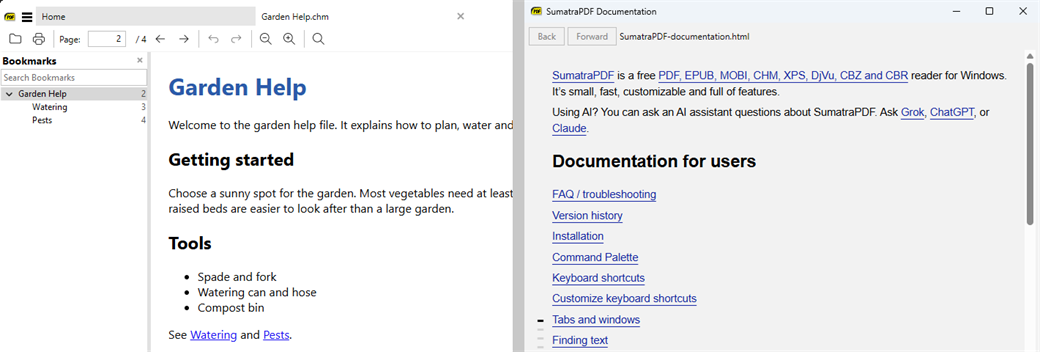
If Microsoft Edge WebView2 is installed, CHM help files are shown with it instead of the old Internet Explorer engine. If it isn’t, the old viewer is used. The manual (Help) opens in a window inside SumatraPDF and is served from inside the program. If WebView2 is unavailable, the online manual opens instead.
Adobe Reader-compatible /p and /t printing options
For scripts written for Adobe Reader, SumatraPDF accepts
/p (open the print dialog) and /t (print silently to a printer) on the command line.DisableAutoLinks setting
The new
DisableAutoLinks advanced setting stops SumatraPDF from turning web addresses and email addresses in PDF text into clickable links (#5703).Duplicated tabs keep their view
Duplicating a tab keeps the page, zoom and scroll position of the original tab.