Extend text selection with Shift + arrows
in 3.7 pre-rel
When text is selected,
Shift + arrow keys extend the selection by one character or one line (#5814).Find results: Home / End
Better link handling
Links with
file:// URIs now open the file as a local document instead of sending it to the browser. Ctrl + clicking a link to another PDF opens it in a new window. When opening in an external viewer (Acrobat, Foxit, PDF-XChange), the current zoom is passed along, and for Acrobat the scroll position too.Annotation saving improvements
The Save button of the floating Annotations window and the toolbar’s save menu now name the file they will overwrite (e.g. “Save changes to foo.pdf”). Save As suggests
foo Copy.pdf so you don’t overwrite the original by accident. File attachment annotations now support Embed, which lets you pick a file to embed in the PDF.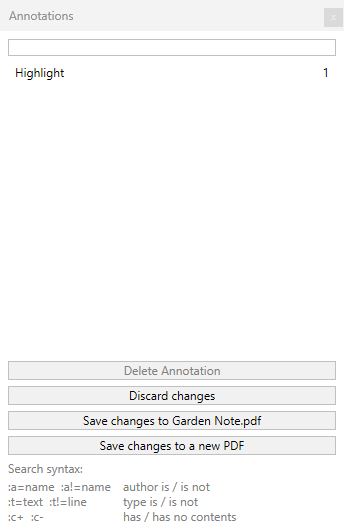
Modern File Open dialog
File / Open now uses the modern Windows file dialog, and there is no longer a limit on how many files you can select at once.
DDE Search supports quotes
The DDE
Search command now accepts double quotes in the search term, written as "" (two double quotes).