Navigate Files in Folder: more keyboard and file actions
in 3.7 pre-rel
The Navigate Files in Folder window (
CmdNavigateFilesInFolder, Ctrl + Shift + Up) got many improvements. Del moves the selected file to the Recycle Bin (closing its tab first if it is open), F5 refreshes the listing, and Alt + Up goes to the parent directory. Ctrl + Enter / Ctrl + double-click switches to the tab already showing that file, or opens it in a new tab. The listing now stays up to date as files change, and the window also works from the home page.Find shows search progress
While a search is still running, the Find status shows the page currently being scanned next to the running match count (e.g.
520 61), so a long search over a big document visibly makes progress. Results in the floating Find window are now always listed in page order, even when the search started in the middle of the document.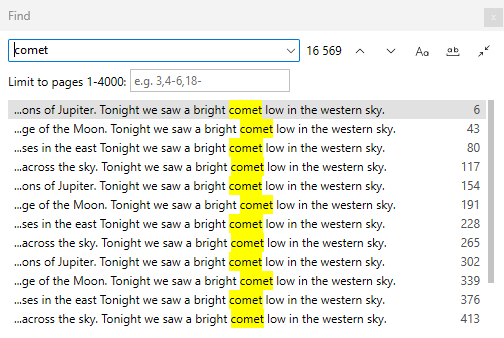
Amber warning notifications
Warning notifications (“File not found”, “Errors in document”, update messages) now use an amber background in every theme. Before, the color came from the theme accent and could look purple or bright blue, or look the same as a normal notification.

Markdown internal links jump to headings
In Markdown documents, heading anchors now follow GitHub’s rules, so in-document links like
#intr_state jump to the right heading (discussion #5883).