Default alignment for free text annotations
in 3.7 pre-rel
New
Annotations.FreeTextAlignment advanced setting (left, center, right) sets the text alignment of new free text annotations, so you don’t have to change it on every one. right suits right-to-left scripts such as Arabic, Hebrew and Persian. CmdCreateAnnotFreeText and the other CmdCreateAnnot* commands take a matching alignment argument (#4799).Ctrl+Tab switcher improvements and classic mode
The
Ctrl + Tab tab switcher window is now sized to fit the number of open tabs. The new CtrlTabSimple advanced setting brings back the pre-3.6 behavior, where Ctrl + Tab / Ctrl + Shift + Tab jump straight to the next or previous tab without the switcher.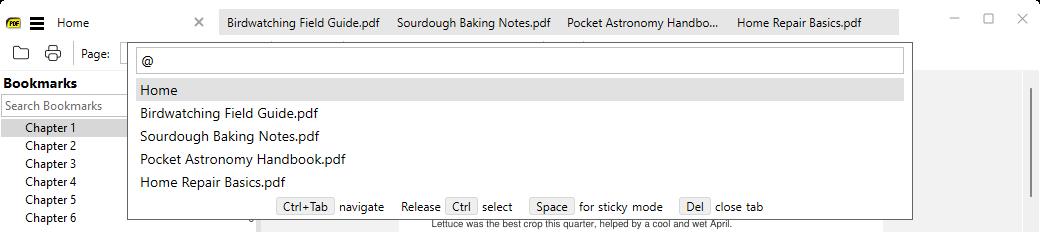
Send long selections to web services
SelectionHandlers no longer cuts off long selections without warning. A new Method field supports POST (SumatraPDF sends the request itself and can add API keys via Headers) and POST-VIA-BROWSER (a form submitted in your browser, using your normal login). Other new fields are Body, ContentType and Headers, plus new placeholders: ${selectionjson} inserts the selection safely inside JSON, and ${selectionfile} saves the selection to a temporary file for Exe handlers (#5900).Command palette shows what toggles do
More toggle commands in the command palette show their current state. Toggle Zoom and Toggle Cursor Position, which cycle through several options, show what comes next (e.g. “switch to fit width”).
Smart dark mode leaves artwork alone
In smart dark mode, full-page illustrations such as covers are no longer recolored, and images made of tiles are treated as one picture. Scanned pages are still recolored as before.