Reading progress on the home page
in 3.7 pre-rel
The home page shows how far you’ve read each document: on list rows, and under the file name of thumbnails (
Page 12 of 62, with a thin yellow line along the bottom of the cover; 3:5/20 for chaptered ebooks). Turn it off with ShowHomePageReadingProgress = false (#6199).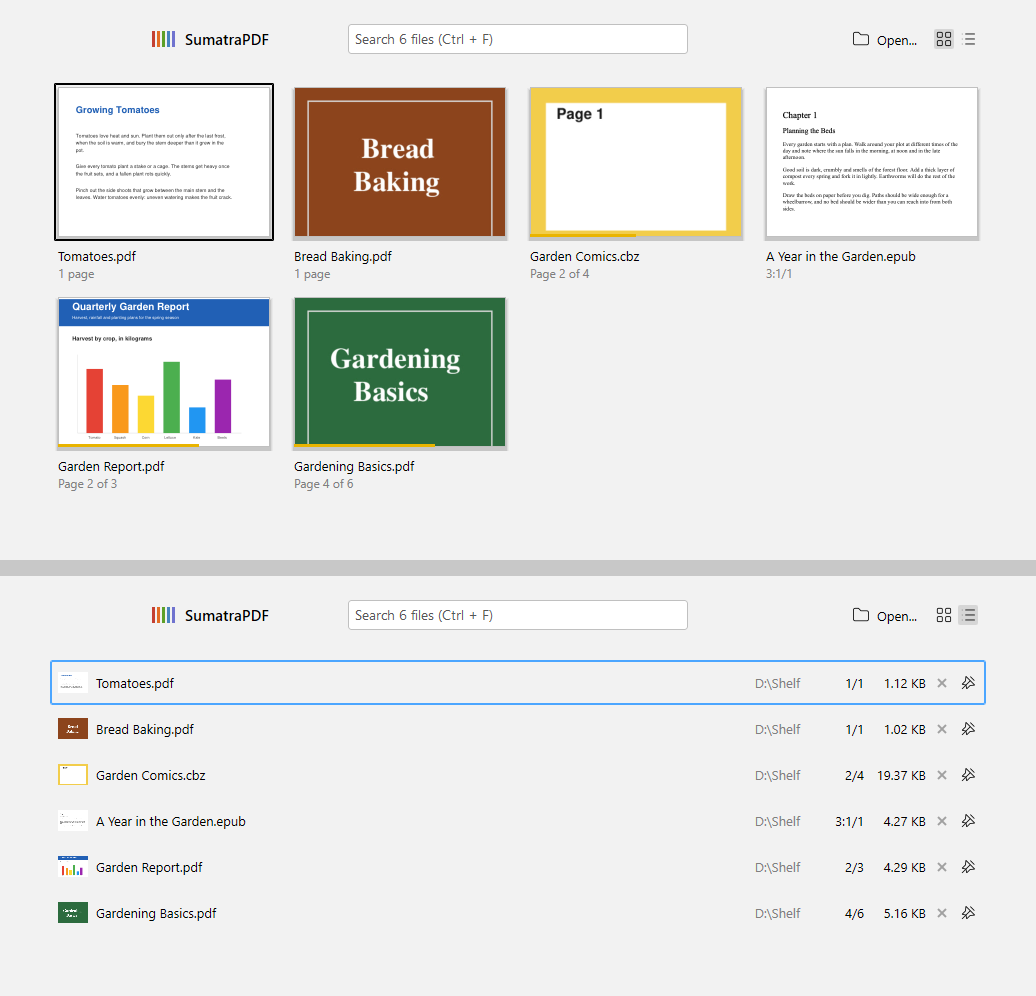
Choose the print dialog and see more printer settings
New
PrinterUI setting picks which dialog Print (Ctrl + P) opens: auto (default), modern (the Windows 11 dialog with preview) or classic (the older dialog, which has a Preferences button for the printer driver’s own settings). The Windows 11 dialog’s More settings pane now lists the printer’s own options: color, duplex, collation, paper size and type, quality, pages per sheet, tray, binding, stapling and hole punch (discussion #6202).ScrollEdgeTurnsPage setting
New
ScrollEdgeTurnsPage setting (on by default). Turn it off so that scrolling past the top or bottom of a zoomed-in page in single page, facing or book view stays on that page. You then change pages only with the keyboard, toolbar or scrollbar (#6201).Save PostScript as PDF
When a PostScript document is open, Save As now offers PDF as a format and saves the converted PDF. Thumbnails of PostScript files also no longer run Ghostscript a second time (#6200).
Read Aloud follows the page in non-continuous modes
In single page, facing and book view, Read Aloud now turns pages as it reads, so the spoken text stays on screen.