Microsoft Reader (.lit) ebooks
in 3.7 pre-rel
SumatraPDF now opens Microsoft Reader
.lit ebooks, including DRM1 (“sealed”) ones.Chrome-style tabs
Tabs now work more like Chrome: only the selected tab shows a close button, so clicking a background tab always selects it and never closes it. Background tabs show more of their title. A tab whose file failed to load shows its title in red.

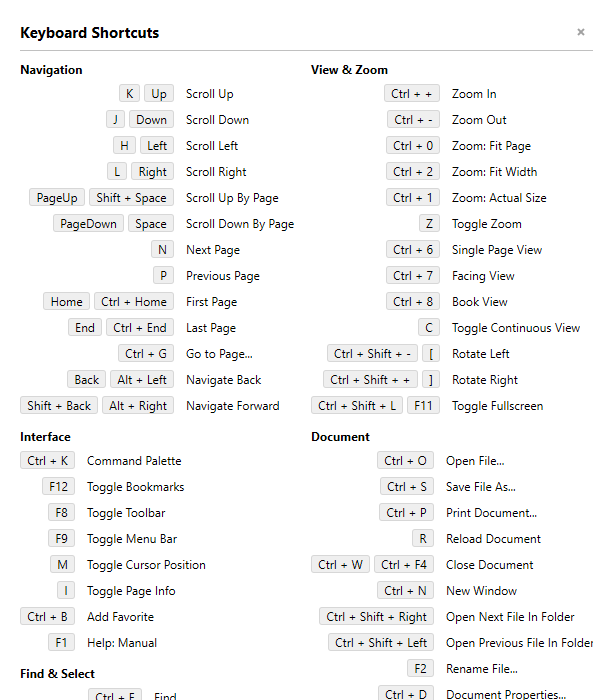
Keyboard Shortcuts window reflects your bindings
The Keyboard Shortcuts help window now shows each command’s real shortcut, including any you have rebound or cleared. The layout is simpler, with a fixed two-column layout and no footer. Navigate Files in Folder shows its shortcut help as key-caps in a neat table.
Save Image as an exact copy
Image / Save now saves an exact copy of the original image by default, in its original format (for example
.jpg for a JPEG), unless you crop, resize or change the extension.Translate Selection with Antigravity
Translate Selection now supports Antigravity (
CmdTranslateSelectionWithAntiGravity), alongside Grok Build, Claude Code and OpenAI Codex, when its CLI is installed.More details in Document Properties for images and comics
Document Properties shows image size and DPI even for images without EXIF data, such as typical PNGs (#5950). For comic book archives, it lists each file’s size.