Read Aloud underlines the spoken sentence and word
in 3.7 pre-rel
While Read Aloud is playing, the sentence being spoken is underlined in blue and the current word in amber. This replaces the old yellow background highlight, so the text stays easy to read.
Filter annotations by author, type and contents
The search box in the floating Annotations window (Find Annotation) understands conditions as well as plain words:
:a=kjk / :a!=kjk (author is / is not), :t=text / :t!=line (type), :c+ / :c- (has / has no contents). Plain words still match the contents. Conditions can be combined, and the ? beside the search box opens the syntax in the manual (#6034).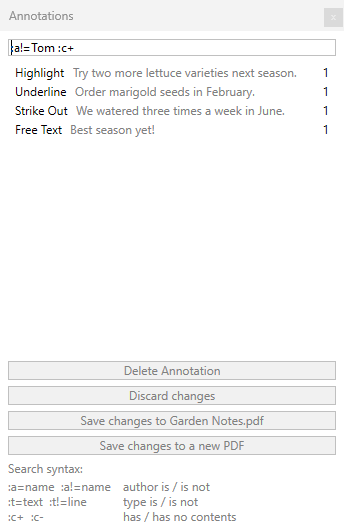
Close a polyline with Ctrl+click
When you draw a polyline annotation, Ctrl+click adds the last vertex and closes the shape back to its starting point in one step (#6119).
Page Up / Page Down in the Find results list
With the focus in the Find window’s results list, Page Up and Page Down page through the results instead of scrolling the document. A focused table of contents tree and CHM or Markdown documents now page their own content the same way (#6117).