Go To Home Page
in 3.7 pre-rel
New Go To Home Page command (
CmdGoToHomePage, command palette) switches to the Home tab. With NoHomeTab = true there is no Home tab, so the command adds one as the first tab; close it with its ✕ (#6228).Back to where a search started
Starting a search adds a navigation point at the view where it started, so after find-as-you-type and Find Next have moved through the matches,
Alt + Left (or Backspace) takes you back there (#6230).Free Pan
New Toggle Free Pan command (
CmdToggleFreePan, command palette) lets you scroll past the page edges by half a window. Any part of a page, such as a corner of a technical drawing, can then be moved to the center of the screen instead of staying at the window edge. Zoom and page placement don’t change; it only adds room to scroll. It’s remembered per document and has no default shortcut (discussions #6224, #6164).Settings, not options
Menus and dialogs now say “settings”: Settings → Options… is Settings… and its dialog is titled Settings, and Advanced Options… is Advanced Settings…. New Open Advanced Settings File… (
CmdOpenSettingsFile, Settings menu, command palette) opens the settings file in your text editor. CmdAdvancedOptions is gone, but a shortcut that uses it still opens Advanced Settings. The command palette lists some commands under a second name: Advanced Settings… also as Advanced Options…, and Browse Files In Folder… also as Navigate Files in Folder….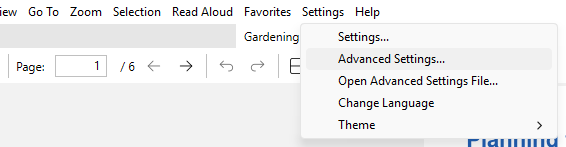
Setting help in the command palette
In the command palette’s
= mode, the description of the selected setting is shown under the list, as in Advanced Settings.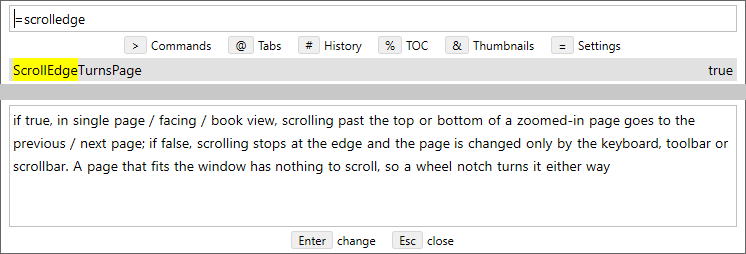
Navigate Files in Folder: Back, Forward, Home, search and editable path
The Navigate Files in Folder window has Back, Forward, Up and Home buttons. Back / Forward (
Alt + Left / Alt + Right) go through the folders you visited, Up (Alt + Up, Backspace or the .. entry) goes to the parent folder, and Home lists your drives followed by Explorer’s Quick access folders and files. A search field filters the list as you type (press Ctrl + F, or just start typing). Click the folder path to edit it, or paste a path: Enter goes there, and a file path opens its folder with the file selected (#6232).Book covers as home page thumbnails
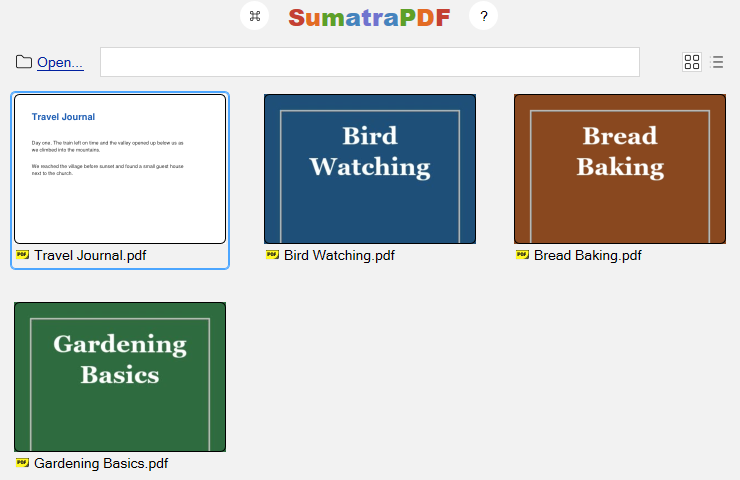
Home page thumbnails use a cover image saved next to the document with the same name (
Book.jpg, .jpeg or .png beside Book.epub, the way Calibre saves covers), or else the cover an EPUB declares, instead of a picture of page 1 (#6236).