Signature validation
in 3.7 pre-rel
Signatures in PDFs are now validated: opening a signed PDF shows a bar saying whether they are valid, and Properties gives each one a status, including Valid qualified electronic signature from the EU Trusted List. Signatures are checked as of the time a trusted timestamp proves, and revocation is checked from the document, Windows’ cache and online.
ShowSignatureStatus = false turns the bar off.Signatures bar and panel
Signed PDFs show their signatures the way Acrobat does: a bar above the document instead of a notification, a Signatures view in the sidebar (
CmdShowSignatures), a status icon on each visible signature and a Signature Properties dialog.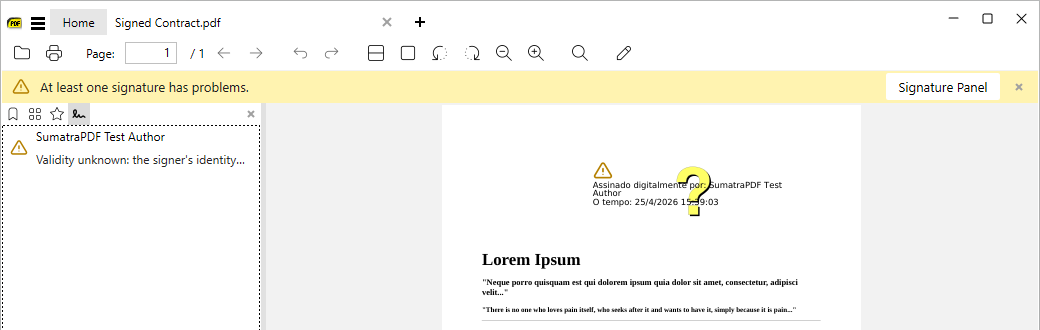
New Home tabs
The tab bar has a + button after the tabs that adds another Home tab, with the cursor in its filter box (
CmdNewTab). A file opened from it replaces it. You can move and close it, and it isn’t restored with the session. The first Home tab is now only as wide as its label and has no close button; middle-click or Ctrl + W still close it (#6464).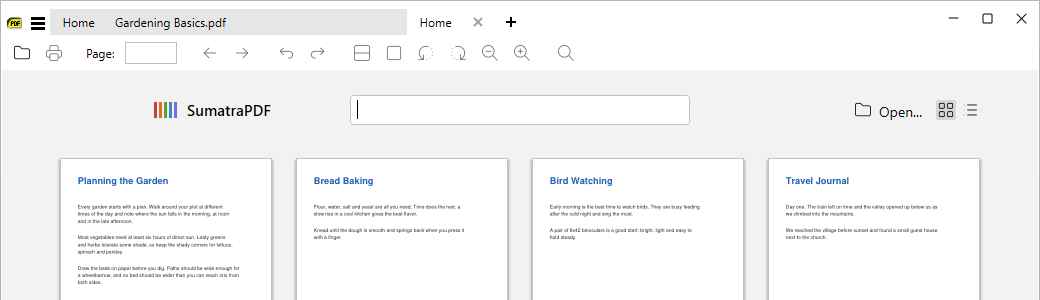
Link SumatraPDF Web
File → Link SumatraPDF Web… (
CmdSumatraPDFWeb, command palette) opens a dialog to paste an API key; Log in… opens the browser to get one. The key is checked before it is saved. Forget key removes it from this computer; it doesn’t revoke it on the website.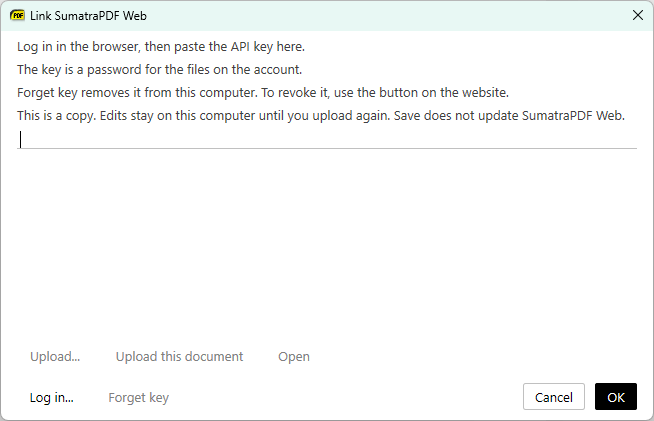
Obsidian highlights and wikilinks in Markdown
Markdown documents show Obsidian highlights (
==text==) and wikilinks: [[Page]], [[Page#Heading]], [[#Heading]] and [[Page|alias]] link to a Markdown file next to the current note (#6463).Debug: Save Settings
Debug: Save Settings (
CmdDebugSaveSettings) writes the settings file now. It’s in all builds but isn’t meant for typical use (#6468).