Convert to Images for any document
in 3.7 pre-rel
Convert PDF to Images is now Convert to Images (
CmdConvertPdfToImages) and renders the pages of any document SumatraPDF draws: PDF, XPS, OFD, DjVu, comics, and ebooks (EPUB, FB2, MOBI) as laid out on screen (#6505).Extract Pages from XPS, EPUB and other documents
Extract Pages (was Extract Pages From PDF) also works for XPS, EPUB, FB2, HTML, Markdown, TXT, Office and OFD documents: it writes the chosen pages to a new PDF that keeps their text. An EPUB is extracted as it is currently laid out (#6509).
View As Hex
View → View As Hex (
CmdViewAsHex) shows the bytes of the current file in a new tab: offset, hex and text columns, with as many bytes per row and rows as fit the window. The arrow keys, Page Up / Page Down, Home / End, the mouse wheel and the scrollbar scroll it. It reads only what is shown, so large files open instantly. When a file fails to load, the error page has an Open in hex view link that shows it in the same tab.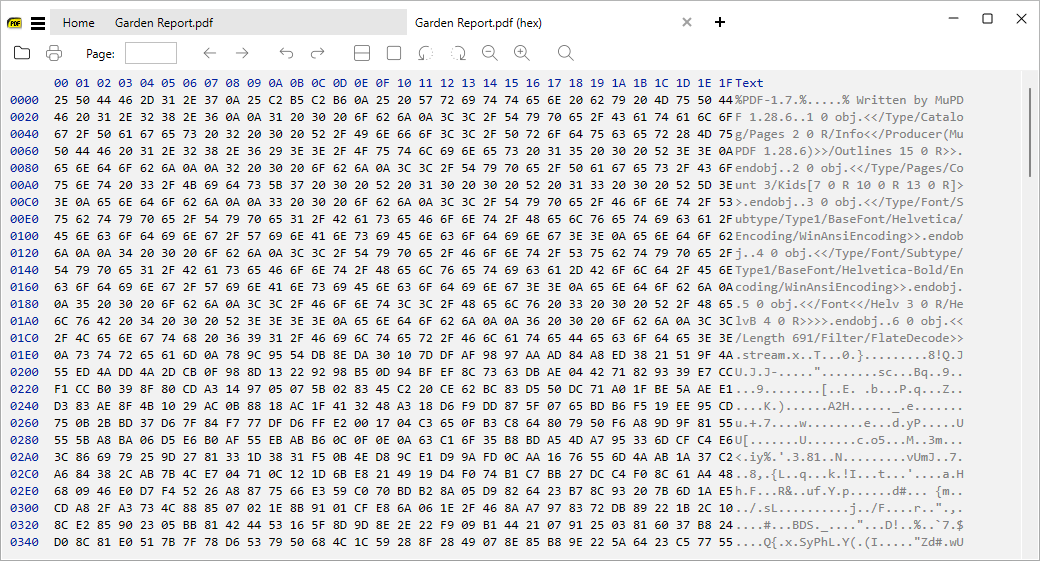
Tabs of missing files stay open
A document of the restored session that no longer exists keeps its tab, which says the file is missing, instead of being dropped with a notification (#5585).
KeepMissingSessionTabs = false drops them as before. Close Tabs of Missing Files (CmdCloseMissingTabs, command palette) closes all such tabs at once (#6506).Copied text flows like the original
Copying selected text (
Ctrl + C) and Translate Selection join the wrapped lines of a paragraph with a space, including ragged-right text, and keep the line break after a paragraph, a heading or a line of code, so pasted text flows like the original instead of breaking at every line (#5793).