Find blinks around the match
in 3.7 pre-rel
Find blinks a ring around the found text a few times, so the match is easy to spot on a busy page, such as a circuit board drawing. It uses
ForwardSearch.HighlightColor with a white halo; turn it off with FlashFindMatch = false (#6536).Keyboard selection: caret commands
In keyboard selection (
F7), the new CmdCaret* commands (CmdCaretUp, CmdCaretDown, CmdCaretWordLeft, CmdCaretLineStart, CmdCaretPageDown, CmdCaretDocEnd and others) move the caret like the arrow, Home / End and Page Up / Page Down keys, so you can bind other keys to them (Emacs-style Ctrl + n). Outside keyboard selection they do what the matching key does (#6539).Keyboard selection follows Find
In keyboard selection (
F7), finding text moves the caret to the match, like Emacs isearch: to its end when searching forward, to its start when searching backward. The match becomes the selection, or in visual mode (v) the selection grows to it (#6541). When the caret leaves the view, the document scrolls just enough to show it, like a text editor, and in single page mode goes to the caret’s page (#6542).On / off state for toggle commands
All toggle commands (
CmdToggle*, CmdInvertColors, CmdSelectTextViaKeyboard and a few others) take an optional state argument: [CmdToggleGrayscale on] turns it on and leaves it on if it already is. Without it they toggle, as before (#6540).See-through text box editing
Editing a text box (free text annotation) in place no longer hides the page under it with a white box: without a background color, the page shows through, and the annotation itself is left out while you type. The annotation context menu has Edit Annotation Text (
CmdEditAnnotationText) (#6534).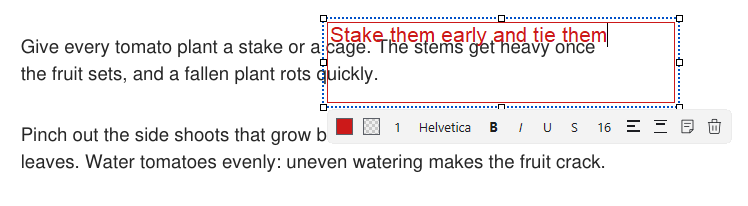
Read Aloud marks vertical text
Read Aloud marks vertical text (Japanese, Chinese) with one thin line beside each column, on the left of the characters and away from the furigana, instead of a short stroke under every character. The colors of the sentence and current word lines are set with the
ReadAloudSentenceColor and ReadAloudWordColor advanced settings (#6530).Opening a document that is on another virtual desktop
The
OpenOnOtherDesktop advanced setting says what happens when you open a document that is already open in a window on another virtual desktop: switch (the default) switches to that desktop, move brings the window to the desktop you are on, copy opens the document again there. A file opened in a new window always lands on the current desktop (#6546).Turn off the document errors notification
ShowDocumentErrors = false turns off the Errors in document notification shown when a document has errors; Show Errors stays in the context menu (#6558).Background color for DjVu and XPS
FixedPageUI.WindowBgCol, the color around the pages (set with Change Background Color… > For all … files), now applies to DjVu and XPS documents too, not only PDF (#6543).