Search matches marked on the scrollbar
in 3.7 pre-rel
While searching, the vertical scrollbar marks where the matches are, with the current one in the selection color: across the whole document in continuous views, on the current page in single page view. It works with
Scrollbars = smart or overlay; a smart scrollbar stays visible while it shows marks.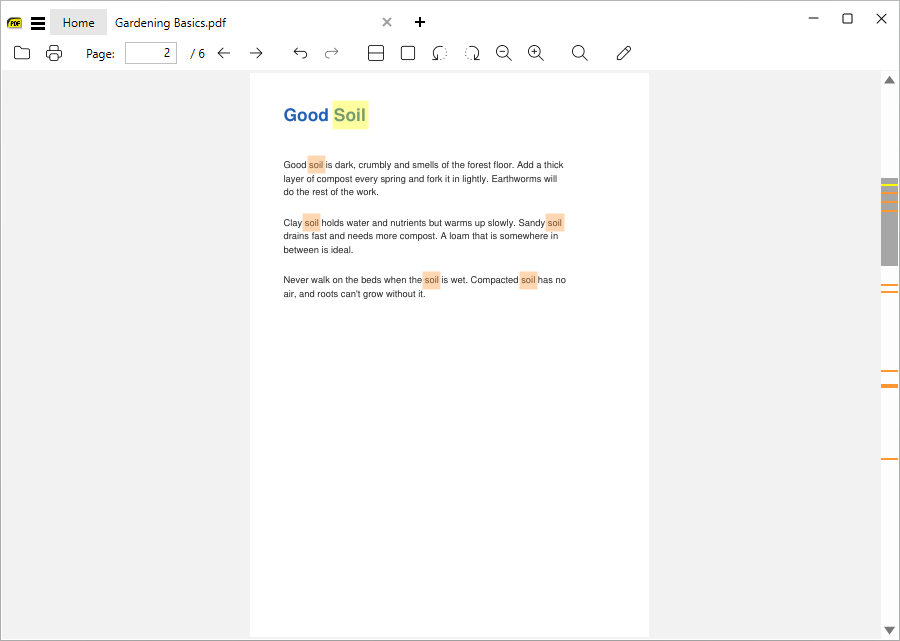
Page size for ebooks
eBook Settings has a Page row: the size of the page an ebook is laid out into, Fit window (the default), A5, A4, US Letter or a custom width and height in points, for the open document or for all ebooks. It is stored as
EBookUI.LayoutDx / LayoutDy (#4210).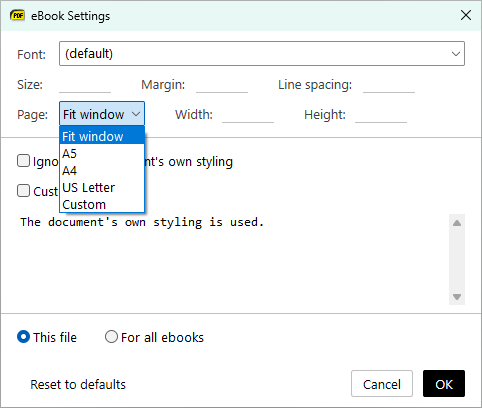
sumatrapdf-tool.exe runs every command-line operation
sumatrapdf-tool.exe runs every command-line operation of SumatraPDF.exe, not only the mupdf tools: also cli, -print-to, -dump-exif and the rest, with the output, input redirection and exit code of a console program. It runs the SumatraPDF.exe in its folder and refuses arguments that would open a window.